
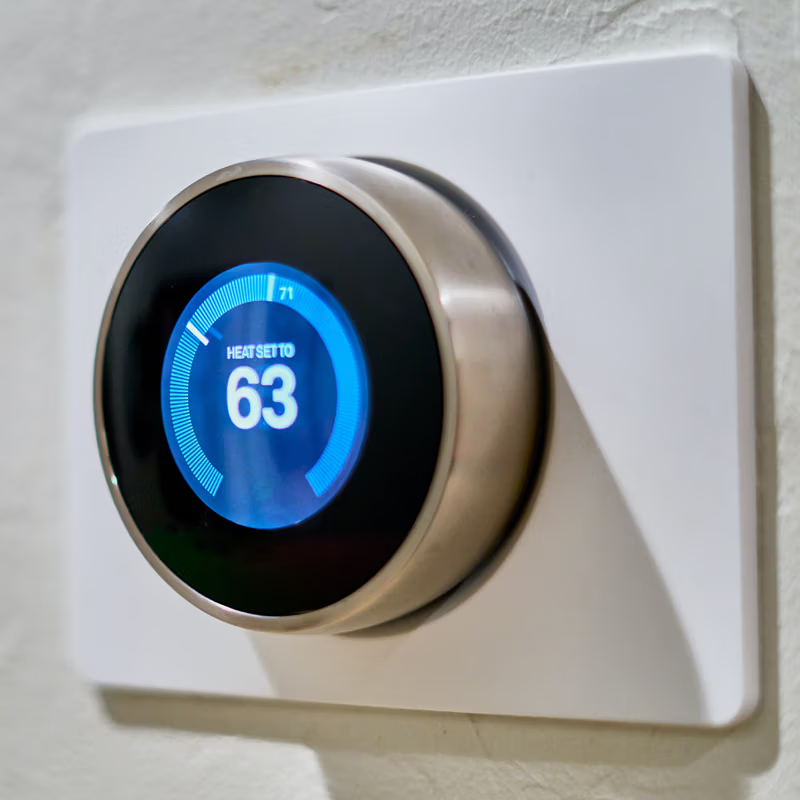
The Google Nest Smart Thermostat is by far the best smart thermostat available on the market. It retails for a hefty £219*, but you’re guaranteed to get your money’s worth!
Remotely controls heating and hot water. Control temperature, check energy history, control hot water tank/schedule and receive alerts via the Nest app on a smartphone. OpenTherm technology modulates a high efficiency condensing boiler, enabling energy saving.
Functions include auto-away and auto-schedule so that programming is not necessary, as Nest learns from frequent use and programmes itself accordingly.
- Auto-Schedule
- Auto-Away
- OpenTherm Technology
- Remote Control
- Backlit LCD Display
- Suitable for Combi & System Boilers
- Hub Not Required, Internet Connection Required
Further Information on the Google Nest website
What makes Nest Learning Thermostat so smart?
Nest Learning Thermostat is compatible with all boilers.
This sleek thermostat can learn your daily routine and habits and use this data to switch your heating on/off when you leave or arrive home. It can also adjust the temperature based on the time of day, but if you prefer to adjust the scheduling manually, you can do that too.
Nest Learning Thermostat is easy to set up and use. It is fully compatible with Google Home, so if you have a Google Assistant smart speaker like Google Home, Google Home Mini or Google Nest Mini, you can simply say, “Hey Google, set the thermostat to 19 degrees.”
How does Google Nest Smart Thermostat help you save energy?
- It learns from your habits and automatically programs itself
- Can help save energy while you’re away – In addition to learning your schedule, your Nest thermostat will automatically switch to a custom Eco Temperature when you’re away.
- Teaches you to save when you’re home through “gamifying” energy saving! Each time you change your thermostat to an energy-efficient temperature, you’ll see the Nest Leaf on the thermostat screen and in your Nest app. Over time, it becomes harder to earn a Leaf, which encourages you to save even more energy without freezing!
Does the Nest thermostat really save money?
Yes! The Nest Thermostat can help you save between 8.4% to 16.5% off your heating bills (data published by Google).
Google Nest Smart Thermostat Features
Learns from your habits
Simply put, the Nest Learning Thermostat never stops learning from you.
As your life changes (due to different work schedules, sleep schedules, weekdays vs weekends schedules, etc.), your habits at home change too. That’s why the Nest automatically adapts as your life changes to set your house at the right temperature.
It also considers all the internal factors, such as insulation and external ones, like the weather and uses that data to adjust the temperature.
Not only does it learn from your habits, but it also creates a unique schedule just for you. Pretty smart!
Use the Google Nest Smart Thermostat to control your heating from anywhere
Nest mobile app lets you control your heating on the go using your mobile, tablet or laptop.
So you can turn the heating on when you’re coming home or turn the temperature down while you’re in bed – so convenient!
Save energy with the Nest Leaf
Every time you change the temperature to save energy, you’ll be rewarded with a Leaf – kind of like a little digital sticker to say well-done!
The Leaf learns how to help you save, so it appears at different temperatures for different homes.
Control your hot water
Now you can control your hot water tank with the Nest Learning Thermostat.
It comes with a hot water schedule — just adjust it from the Nest app.
You can boost the heat so that you have extra hot water if you want it. And when you’re away from home for a few days, you don’t have to remember to turn off the hot water.
The Nest Learning Thermostat will cleverly do it for you.
Quick view
Press the display and turn the ring. You’ll see a summary of what your thermostat is up to, and you can reach Settings, Energy History or your schedule.
Sleek Design
The circular, sleek and minimalistic design helps Nest stand out, and the high-resolution display takes the interface to the next level.
Nest comes in four colours, so you can choose the most suitable fit for your home aesthetic; stainless steel, black, white and copper.
You can fix your Nest thermostat on the wall or buy a Nest stand (sold separately for £35) to put the Nest thermostat on a bookcase or desk, which allows you to move it to a better position.
You can change the language displayed on Google Nest to English, French, Dutch, Spanish or Italian.
Keep your home safe
Each of your Google Nest products can send you alerts to let you know when something in your home needs your attention. Whether it’s push notifications to your phone, emails, or both, they’ll try to alert you about important events, emergencies and technical issues.
Critical alerts let you know about important events, like a smoke or carbon monoxide alarm, even if your phone’s volume is set to low and you’ve turned on Do Not Disturb.
Location tracking (Geotracking)
Nest can use the location on your phone or/and your family members’ phones to turn the heating off when you’re all out, which can save energy.
Child lock
Kids tend to love playing with gadgets instead of their own toys (speaking from experience!), so Nest lets you activate the child lock feature to protect you from little fingers- and extortionate heating bills!
OpenTherm Tech
OpenTherm is an advanced language which allows your thermostats and boiler to talk to each other, and this allows your thermostat to control the boiler, saving you even more money on your heating bills.
These Google Nest thermostats support OpenTherm:
- Nest Thermostat E
- 3rd gen Nest Learning Thermostat
Nest Thermostat General Specifications
- Hot water – Yes
- Installation – Depends on the model
- Operating systems – Android, iOS
- Thermostat controls – Buttons
- Height – 8.4cm
- Width – 8.4cm
- Depth – 3.22cm
- Price – £219*
- Standard warranty – 2 years, but if you get it installed by a Nest Pro installer, you’ll get a 3-year extended Pro Warranty, making the total warranty period 5 years.
Can I install Nest Thermostat?
Nest recommends professional installation for a 3rd- or 2nd-gen Nest Learning Thermostat, but you could install a Nest Learning Thermostat by yourself, depending on your system.
Take a look at this page to learn how to install Nest Thermostat.
Google Nest Smart Thermostat Reviews
Google Nest is a Which? Best Buy Product. Which? Gave Google Nest Smart Thermostat an overall rating of 75%, that is the best rate for a smart thermostat, and here’s their verdict;
“It might be one of the older models on the market, and it’s one of the more expensive smart thermostats you can buy, but this is still one of the best we’ve tested. The scheduling can be difficult, but its impressive learning capabilities means you might not need to manually program anyway.”
Other Heating Controls
If the Google Nest Smart Thermostat is not something you’re looking for then Rapid Response Heating also supply and fit the following heating controls